CONTACT US


PRODUCT HIGHLIGHTS
- Limited Warranty2 Year
- Shipping Weight1 lbs.
- for Smartphone, Tablet, Microphone, Monitor, Notebook
- Memory Card Reader
- SD, microSD
- USB Type C
- 3 Displays Supported
- 4K UHD, Full HD
- 3840 x 2160, 1920 x 1080
- 5 x USB Ports
- 3 x USB 3.0
- 3 x USB Type-A Ports
- USB Type-A
- 2 x USB Type-C Ports
- USB Type-C
- 1 x RJ-45 Ports
- Network (RJ-45)
- HDMI
- VGA
- DisplayPort
- Black
- Wired
- Gigabit Ethernet
- Windows 10, Mac OS X 10.14 Mojave, macOS Big Sur
- 100W USB Power Delivery
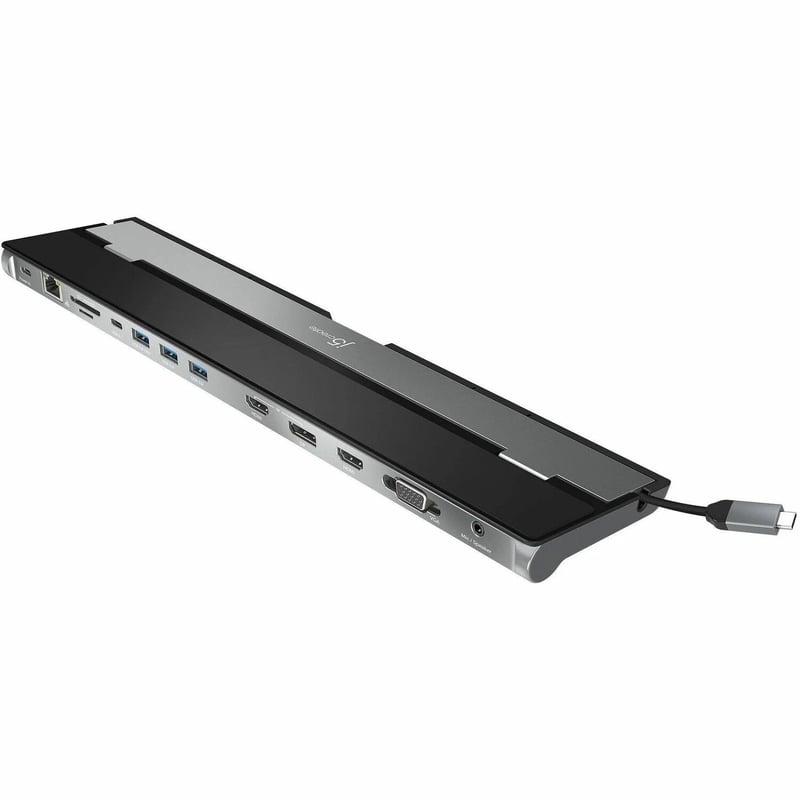
j5create JCD543 USB-C Triple Display
 In Stock
PRODUCT HIGHLIGHTS
- Limited Warranty2 Year
- Shipping Weight1 lbs.
- for Smartphone, Tablet, Microphone, Monitor, Notebook
- Memory Card Reader
- SD, microSD
- USB Type C
- 3 Displays Supported
- 4K UHD, Full HD
- 3840 x 2160, 1920 x 1080
- 5 x USB Ports
- 3 x USB 3.0
- 3 x USB Type-A Ports
- USB Type-A
- 2 x USB Type-C Ports
- USB Type-C
- 1 x RJ-45 Ports
- Network (RJ-45)
- HDMI
- VGA
- DisplayPort
- Black
- Wired
- Gigabit Ethernet
- Windows 10, Mac OS X 10.14 Mojave, macOS Big Sur
- 100W USB Power Delivery
j5create JCD543 USB-C Triple Display
Overview
This triple display docking station turns your Mac® or Windows® laptop into a full workstation with a DisplayPort™ output, two HDMI™ outputs, and a VGA output, with resolution support up to 4K (3840 x 2160) on two displays and 1080p on the other one. You can also use your laptop screen for four displays in total, making it easy to access multiple applications at once. With 100W Power Delivery, three USB™ 3.0 ports, and a USB-C™ port, this docking station is perfect for your MacBook®, Dell® XPS™, or other USB-C™ laptop requiring additional ports.This USB™ 3.0 docking station is also equipped with a RJ45 Gigabit Ethernet port, memory card reader/writer, and combo audio jack for maximum productivity. The elevated design assists with heat dissipation and, with its double-sided cable storage compartment, ensures an easy connection regardless of your USB-C™ port's location.All 13 ports are combined into one slim docking station, so you'll have all the connections you need to stay productive!Simultaneous DisplayPort™, HDMI™ and VGA OutputSupports Mirror and Extended modes on both Mac® & Windows®. The easiest way to add a second or third display.HDMI™/DisplayPort™/VGA Output PortSupports 3 Video InterfacesDisplayPort™ Alt mode for HDMI™ or DisplayPort™ resolution of 4K @ 30 HzHDMI™ resolution of 4K @ 30 Hz and VGA resolution of 1920 x 1080 via dual outputMaximum Resolutions Supported in Extended Mode3 types of video outputs for you to connect up to 3 external monitors and together with your laptop display, you'll have a maximum of 4 displays.Maximum Resolutions Supported in Mirror Mode1080p resolution is supported in a triple display configuration when VGA output is connected from macOS® devices while 4K resolution is supported in a dual display configuration when VGA output is not connected from macOS® devicesCharge your notebook or desktop through the JCD543SD™/microSD™ Card ReaderEasily manage and backup your data from your camera, video recorder and moreSuperSpeed USB™ 3.0 Ports | 13 ports in one sleek design for all your needs | Double Sided Cable Storage CompartmentPlace the cable anyway you likeCutting-Edge DesignThe advanced heat-eliminating design makes the JCD543 the perfect solution for expanding any laptop into a full-sized work-station without the worry of overheating.Cable Storage with Dual Openings | Universal CompatibilityCompatible with both Mac® & Windows® More from the Manufacturer
OVERVIEW
j5create JCD543 USB-C Triple Display
This triple display docking station turns your Mac® or Windows® laptop into a full workstation with a DisplayPort™ output, two HDMI™ outputs, and a VGA output, with resolution support up to 4K (3840 x 2160) on two displays and 1080p on the other one. You can also use your laptop screen for four displays in total, making it easy to access multiple applications at once. With 100W Power Delivery, three USB™ 3.0 ports, and a USB-C™ port, this docking station is perfect for your MacBook®, Dell® XPS™, or other USB-C™ laptop requiring additional ports.This USB™ 3.0 docking station is also ...
PACKAGE CONTENTS
Key Features
- TRIPLE DISPLAY FLEXIBILITY & ADAPTABILITY:
- Create A Triple-monitor Setup With 4K HDMI™, 1080p VGA, And 4K DisplayPort™ Outputs And Together With Your Laptop Display, You Can Have A Maximum Of 4 Displays. Available Display Combinations - HDMI™ + VGA + DisplayPort™ - HDMI™ + VGA + HDMI™
- USB-C™ 100W POWER DELIVERY:
- With The Attached USB-C™ Cable, The Dock Will Power And Charge Power-hungry Laptops, With Up To 100W Power Delivery And Power Your Connected Peripherals When It's Used With A USB-C™ Power Adapter.
FEATURES & DESIGN
Key Specifications
| Connectivity Technology | Wired |
|---|---|
| Number of Displays Supported | 3 |
| Device Supported | Smartphone |
| Supported Resolutions | 3840 x 2160 |
| Cable Length | 1.48 ft |
| Screen Mode Supported | 4K UHD |